🕺 I Ran DeepSeek V4 Flash Across Two DGX Sparks Over Ethernet
TL;DR: Two 128GB GB10 computers can run the official FP8 DeepSeek V4 Flash 0731 checkpoint as one tensor-parallel server over their built-in 10Gb Ethernet ports. My improvised link was roughly half as fast as the recipe’s published 200G results, but it worked reliably: about 30 tokens per second for one stream, 85 tokens per second aggregate across six short requests, and a configured 1M-token context ceiling. The 200G cable is a performance requirement, not a functional requirement.
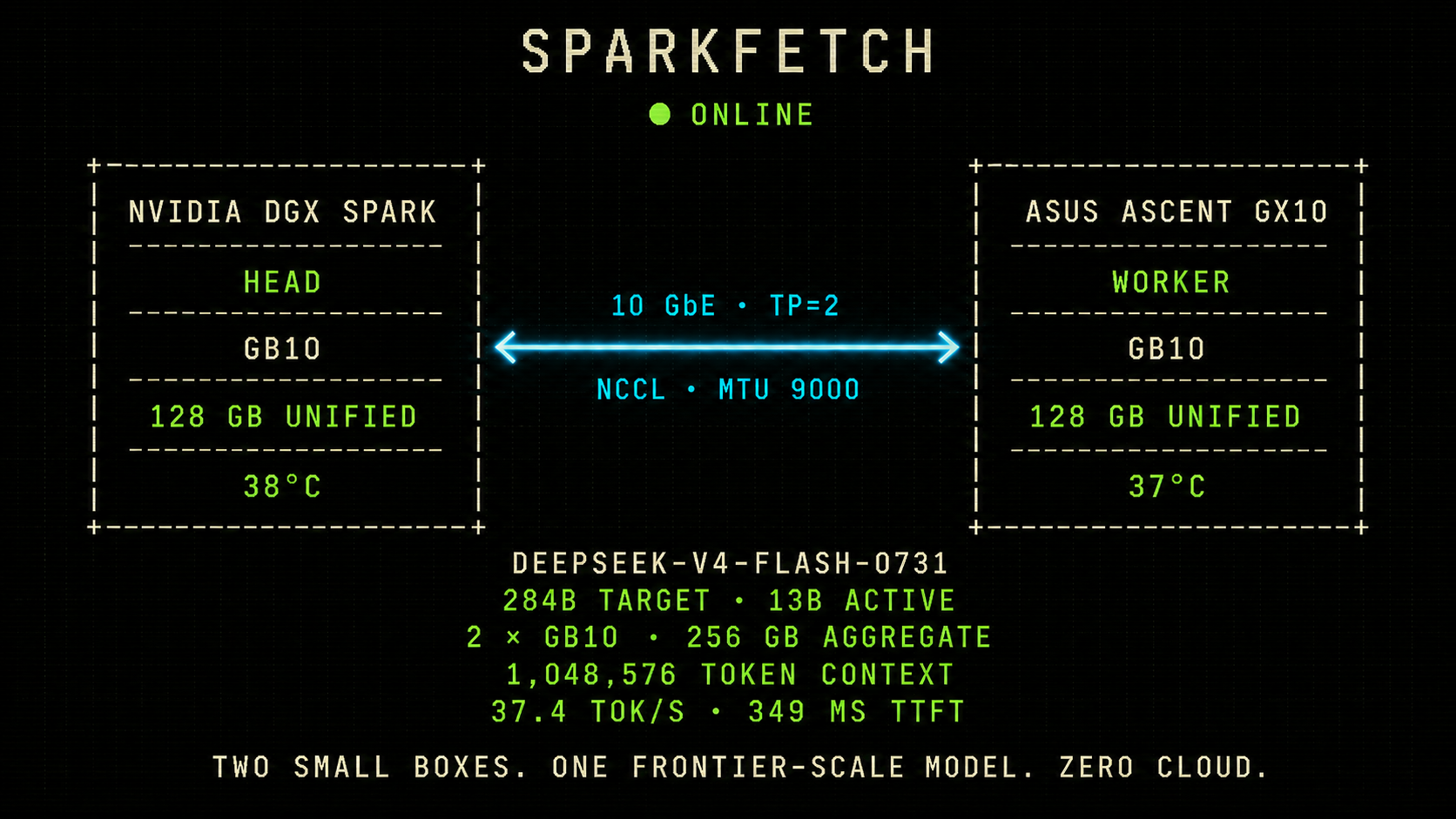
The 37.4 tok/s figure above is the median from my llm-gym comparison; the serving sweep later in this post measured 29–31 tok/s.
I had two 128GB GB10 computers, a 167GB model, and the wrong cable.
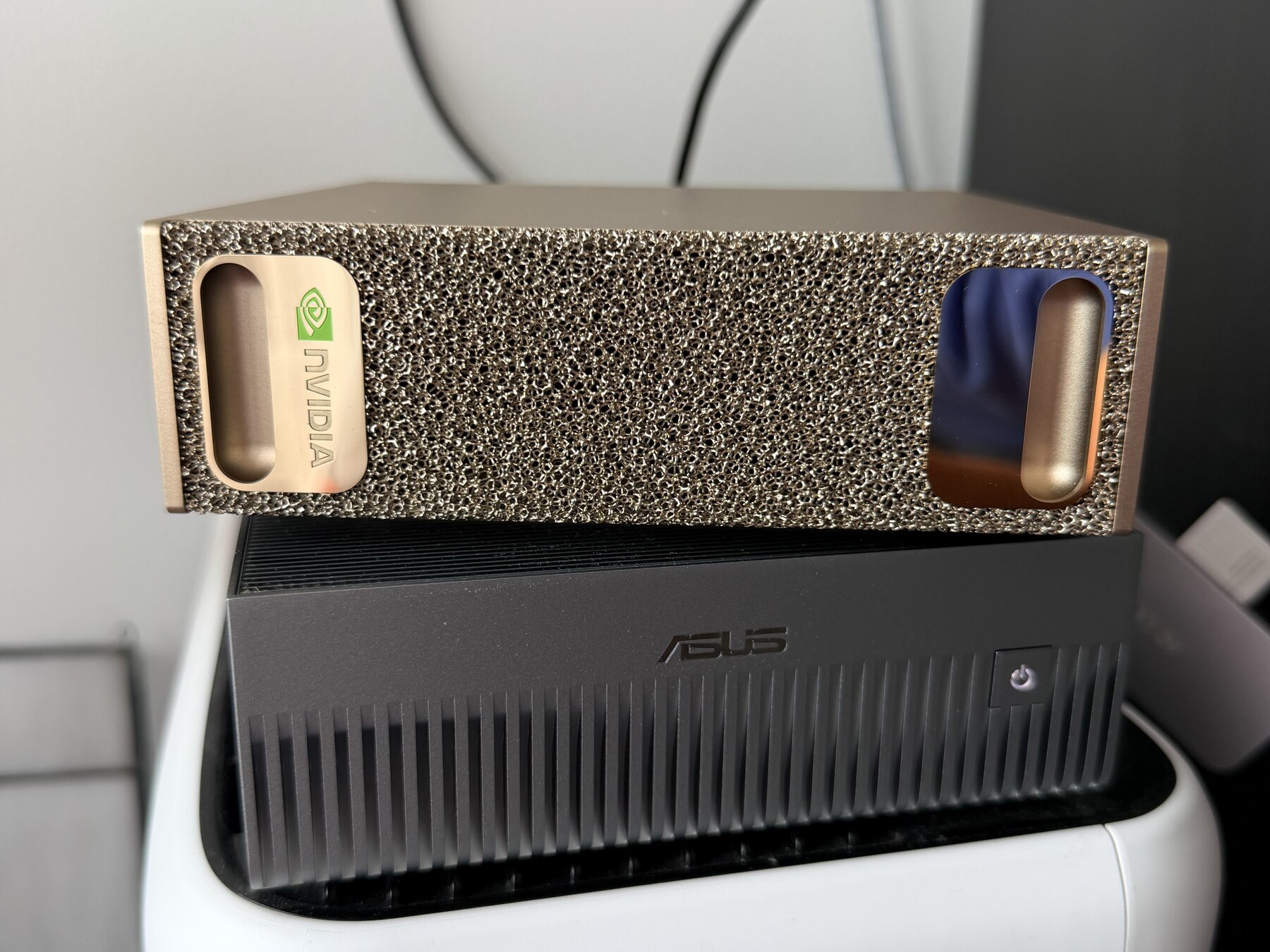
The computers were an NVIDIA DGX Spark and an ASUS Ascent GX10. They use the same Grace Blackwell GB10 platform, so together they give me 256GB of aggregate unified memory. The model was deepseek-ai/DeepSeek-V4-Flash-0731: 284 billion target-model parameters, 13 billion active at a time, plus an attached draft model for speculative decoding. The Hugging Face repository reports 304 billion parameters when that draft module is included.[1]
On one Spark, I had already run a heavily compressed community build: an approximately 81GiB IQ2XXS/Q2 target model plus a 6.5GiB Q2K/Q8 draft model. It was surprisingly good. It scored 197 out of 199 on my llm-gym core benchmark and generated about 29.7 tokens per second.
But I wanted to run the official source checkpoint. It is commonly described as the FP8 model, which is fair shorthand, although “unquantized” is not. Its 48 weight shards occupy exactly 166,886,535,336 bytes, and its tensors use a mixture of FP8 E4M3 block-scaled storage, BF16, FP32, and packed integers. That does not fit comfortably on one 128GB system once the serving engine and KV cache need memory too.
Two boxes solve the capacity problem. NVIDIA even documents a two-Spark setup. The expected connection is the dedicated ConnectX-7 fabric: a QSFP cable carrying 200Gb/s Ethernet, separate from the ordinary RJ45 10GbE port.[2]
Unfortunately, I had bought a QSFPTEK 400G QSFP-DD cable that these machines did not like. Both ends reported the same brutally clear status:
Cable unpluggedThe ConnectX-7 device would briefly enumerate during boot and then power down. A community-reported compatible 200G QSFP56 DAC was on the way, but I did not feel like waiting.
Then I looked at the two unused RJ45 ports.
Ethernet is still a network
Each Spark has a built-in RJ45 10GBASE-T interface.[3] I connected the machines directly with an ordinary Cat6/Cat6a Ethernet cable—no switch—and assigned a tiny point-to-point subnet:
nvidia-spark  enP7s7  10.10.10.1/30  MTU 9000
asus-spark    enP7s7  10.10.10.2/30  MTU 9000
I made the configuration persistent with NetworkManager. The commands looked like this, with the address changed for the second machine:
sudo nmcli connection add \
  type ethernet \
  ifname enP7s7 \
  con-name spark-direct-10g \
  ipv4.method manual \
  ipv4.addresses 10.10.10.1/30 \
  ipv4.never-default yes \
  ipv6.method disabled \
  802-3-ethernet.mtu 9000
Before involving CUDA, Docker, or DeepSeek, I tested the boring part. A 1GiB TCP transfer sustained about 9.9Gb/s from the NVIDIA box to the ASUS and 9.3Gb/s in reverse. Two simultaneous 84GB model transfers ran at roughly 1.0–1.1GB/s without link errors.
That established something useful: the cable and NICs were doing essentially everything 10GbE could do. If inference was slow later, I would not have to wonder whether I had accidentally negotiated at 1Gb/s.
I considered Wi-Fi too. It technically connected, but the machines were getting 702–867Mb/s PHY rates and wildly variable 68–79ms average ping times. That might be fine for sending prompts to a server. It is terrible for making two GPUs stop and synchronize repeatedly inside every generated token. I abandoned that idea quickly.
Convincing the recipe to use TCP
I used MiaAI Lab’s two-DGX-Spark recipe, which packages vLLM tensor parallelism, DeepSeek’s attached speculative draft model, and a 1M-token context configuration.[4] The container was ghcr.io/anemll/dspark-vllm-gx10:0.1.1.
The recipe expected the ConnectX/RoCE path. Its startup logic tried to discover an InfiniBand or RoCE HCA and a GID before NCCL had a chance to fall back to an IP socket. With no working QSFP link, startup failed before the interesting work began.
I initially expected to patch the launcher. It turned out I did not need to. These were the important environment settings on the head node:
WORKER_HOST=10.10.10.2
MASTER_ADDR=10.10.10.1
MASTER_PORT=25000

NCCL_NET=Socket
NCCL_IB_DISABLE=1
NCCL_IB_HCA=unused
NCCL_IB_GID_AUTO=0
NCCL_SOCKET_IFNAME=enP7s7
TP_SOCKET_IFNAME=enP7s7
GLOO_SOCKET_IFNAME=enP7s7

VLLM_HOST_IP=10.10.10.1
WORKER_VLLM_HOST_IP=10.10.10.2
HF_HUB_OFFLINE=1

MAX_MODEL_LEN=1048576
MAX_NUM_SEQS=6
MTP_NUM_TOKENS=5
NCCL_NET=Socket selects NCCL’s TCP/IP transport, while NCCL_SOCKET_IFNAME pins it to the direct 10GbE interface.[5] Disabling IB and automatic GID discovery kept the launcher away from the disconnected ConnectX device. GLOO_SOCKET_IFNAME and the two vLLM host addresses made the rest of the distributed stack use the same route.
Both nodes also needed a complete local copy of the model. The 167GB checkpoint does not cross the cable at startup on every run, and it definitely does not cross it for every prompt. I staged the files on both machines and enabled Hugging Face offline mode so neither worker could quietly download a missing shard during launch.
Then the logs finally said what I wanted:
Bootstrap: Using enP7s7:10.10.10.1
NET/Socket
The full server took about 8 minutes 25 seconds to start. Model loading took roughly 244 seconds on the head and 153 seconds on the worker. Each tensor-parallel rank held about 79.2GiB of weights and allocated about 101GB of GPU/unified memory. The remaining 13.78GiB KV cache held approximately 1.96 million tokens in total—about 1.87 simultaneous full-context requests in the mathematical sense, though I would not actually serve it that way.
What crosses the cable
This is the part I had initially pictured incorrectly.
The model is not copied from one Spark to the other for every prompt. Tensor parallelism splits each large matrix operation across both ranks. Each machine keeps its own weight shard resident in memory, computes a partial result, and then NCCL exchanges or reduces intermediate tensors so the next operation can continue.
That communication happens over and over through the network. A 200Gb/s link has a theoretical line rate of 25GB/s. A 10Gb/s link has 1.25GB/s. The 200G fabric therefore has twenty times the raw bandwidth, along with lower latency and less TCP/IP overhead.
But twenty times the network bandwidth does not imply twenty times the token rate. Each token also spends time doing local memory reads, GPU math, routing through the mixture-of-experts layers, and speculative verification. Some communication can overlap with computation. The network only determines the portion of time spent waiting at distributed synchronization points.
There is another wrinkle specific to DGX Spark: NVIDIA says GPUDirect RDMA is not supported on its unified-memory architecture. Even the ConnectX path uses host buffers rather than letting the NIC directly DMA into GPU memory.[6] The 200G connection still wins decisively on bandwidth, latency, RoCE behavior, and CPU overhead. It just is not magic direct NIC-to-GPU transfer on this machine.
Once I understood that, the 10GbE result stopped looking mysterious. NCCL supports a socket transport. I gave it a valid, fast-enough IP interface. Tensor parallelism cares that its collectives complete correctly; it does not care whether the connector looks impressive.
The results
I ran a bounded 256-output-token sweep across prompt lengths from 256 to 131,072 tokens and concurrency levels from one to six. All 20 test cases finished without NCCL errors, CUDA errors, out-of-memory failures, or worker restarts.
Here are the most useful points from that sweep:
| Prompt | Concurrency | TTFT | Per-stream decode | Aggregate throughput |
|---|---|---|---|---|
| 256 tokens | 1 | 0.42s | 30.47 tok/s | 29.02 tok/s |
| 256 tokens | 6 | 1.97s | 16.84 tok/s | 85.48 tok/s |
| 2,048 tokens | 1 | 0.51s | 31.05 tok/s | 29.24 tok/s |
| 8,192 tokens | 1 | 8.63s | 28.65 tok/s | 14.57 tok/s |
| 131,072 tokens | 1 | 145.64s | 30.17 tok/s | 1.66 tok/s |
| 131,072 tokens | 6 | 496.73s | 0.75 tok/s | 1.79 tok/s |
For ordinary chat-sized prompts, the experience was completely usable. Around 30 tokens per second is faster than I read. Six simultaneous short requests increased total throughput to 85.5 tokens per second, although each individual stream slowed and TTFT rose.
Long context exposed the real cost. Once generation began, even the 131K single request decoded at 30.2 tokens per second. Waiting 145.6 seconds for the first token was the problem. Six 131K requests were technically possible, but nearly eight and a half minutes to first token is not a serious interactive configuration.
That may still be good enough for overnight runs. If six long research or coding jobs are going to run for hours, I care more that they finish by morning than whether the first token appears in eight minutes. The same setup can be a bad interactive chat server and a useful batch machine.
I also ran vLLM’s standardized benchmark with 2,048 input tokens, 128 output tokens, and 12 requests. At concurrency one it produced 31.49 output tokens per second with median TTFT of 583ms. At concurrency six it reached 72.03 aggregate output tokens per second with median TTFT of 1.79 seconds. The five-token speculative draft acceptance rate stayed around 65–67 percent.
How much did the cable cost? The recipe’s matched published 200G sweep reported roughly 64–75 single-stream decode tokens per second depending on prompt length.[4] My 10GbE setup delivered 29–31. In other words, ordinary Ethernet preserved about 40–46 percent of the intended single-stream speed.
| Prompt | Published 200G | My 10GbE | 10GbE share |
|---|---|---|---|
| 256 tokens | 75.4 tok/s | 30.5 tok/s | 40% |
| 2,048 tokens | 68.8 tok/s | 31.1 tok/s | 45% |
| 8,192 tokens | 73.9 tok/s | 28.7 tok/s | 39% |
| 131,072 tokens | 65.2 tok/s | 30.2 tok/s | 46% |
That comparison is the closest thing here to a cable benchmark, but it is still not laboratory-perfect. It compares my machines and software state against the recipe authors’ published run, not the same two machines with one variable changed. I will run the clean 10G-versus-200G A/B test when the correct DAC arrives.
The higher-precision model versus one box
I reran the same 199-question llm-gym core benchmark so I could compare this system with the compressed model I had been using on one Spark:
| Deployment | Model format | Raw score | Weighted score | Median generation speed |
|---|---|---|---|---|
| One Spark | Community IQ2XXS/Q2 | 197/199 | 98.1 | 29.7 tok/s |
| Two Sparks over 10GbE | Official FP8 source checkpoint | 196/199 | 96.0 | 37.4 tok/s |
The two-box system was 7.7 tokens per second faster on this workload, or about 26 percent. The higher-fidelity weights did not produce a visible accuracy win on this small benchmark. Both models missed slightly different “flippy” questions, and a one-question raw difference is not enough evidence to claim either version is smarter.
That result was useful anyway. The compressed single-box model is not merely a consolation prize—it is an excellent practical configuration. The official FP8 model gives me higher-fidelity weights, the full intended serving path, more memory headroom, and better generation speed, but it spends a lot of its two-node advantage waiting on 10GbE.
This is also why “two boxes are faster” is too simple. The comparison changes the model format, serving engine, speculative draft, tensor parallelism, and network at the same time. The 26 percent is the result I observed, not an isolated claim about any one of those variables.
Why nobody recommends this
NVIDIA is not hiding the Ethernet port. It is documented as a separate 10GbE interface. The problem is that the validated cluster path is the 200G ConnectX fabric, so all the setup tooling, diagrams, and troubleshooting instructions naturally assume that topology. NVIDIA’s cluster assistant even uses roughly 184Gb/s as the lower bound for a healthy expected link.[2]
That is reasonable. If a vendor published “you can use the RJ45 port,” many people would interpret that as “the RJ45 port performs the same.” It does not. My short-prompt single-stream result lost more than half the published token rate, and long-context TTFT became painful.
The software defaults reinforce the assumption. The recipe went looking for an HCA and a GID because every normal deployment of this configuration has them. The socket path was already inside NCCL, but I had to explicitly route the rest of the launcher around its RoCE expectations.
So this is not the setup I would recommend buying on purpose. It is the setup I would recommend trying if:
- The correct 200G cable is delayed or unavailable.
- You want to prove that both nodes, model shards, Docker image, SSH setup, and vLLM configuration work before debugging the high-speed fabric.
- You care more about fitting the model than maximizing its speed.
- You already own the two machines and an Ethernet cable, which makes the experiment effectively free.
For latency-sensitive serving, heavy concurrency, or long-context prefill, buy the compatible 200G DAC. For Wi-Fi, I would not tensor-parallelize at all—I would run independent models and route whole requests between them.
What I learned
The interesting distinction was not between “supported” and “unsupported.” It was between capacity, correctness, and performance.
Two machines gave me the capacity to hold the official checkpoint. NCCL’s TCP socket transport gave me correctness over an ordinary network. The expensive fabric gives performance by reducing the time both ranks spend waiting for each other.
I am still going to install the 200G cable when it arrives. I now know exactly what it buys me: not the ability to run the model, but time back at every synchronization point.
Until then, an ordinary Ethernet cable is carrying DeepSeek between two little boxes on my desk, which is much funnier than it has any right to be.
Citations
- DeepSeek V4 Flash 0731 model repository, DeepSeek AI. ↩
- Connecting two DGX Sparks and DGX Spark Cluster Assistant, NVIDIA. ↩
- DGX Spark hardware overview, NVIDIA. ↩
- DeepSeek V4 Flash DSpark on two DGX Sparks, MiaAI Lab. ↩
- NCCL environment variables, NVIDIA. ↩
- DGX Spark CUDA porting guide: GPUDirect RDMA limitations, NVIDIA. ↩
> TL;DR: Two 128GB GB10 computers can run the official FP8 DeepSeek V4 Flash 0731 checkpoint as one tensor-parallel server over their built-in 10Gb Ethernet ports. My improvised link was roughly half as fast as the recipe's published 200G results, but it worked reliably: about 30 tokens per second for one stream, 85 tokens per second aggregate across six short requests, and a configured 1M-token context ceiling. The 200G cable is a performance requirement, not a functional requirement.

The 37.4 tok/s figure above is the median from my `llm-gym` comparison; the serving sweep later in this post measured 29–31 tok/s.
I had two 128GB GB10 computers, a 167GB model, and the wrong cable.
The computers were an NVIDIA DGX Spark and an ASUS Ascent GX10. They use the same Grace Blackwell GB10 platform, so together they give me 256GB of aggregate unified memory. The model was `deepseek-ai/DeepSeek-V4-Flash-0731`: 284 billion target-model parameters, 13 billion active at a time, plus an attached draft model for speculative decoding. The Hugging Face repository reports 304 billion parameters when that draft module is included.<sup><a href="#cite-1" id="ref-1">[1]</a></sup>

On one Spark, I had already run a heavily compressed community build: an approximately 81GiB IQ2XXS/Q2 target model plus a 6.5GiB Q2K/Q8 draft model. It was surprisingly good. It scored 197 out of 199 on my `llm-gym` core benchmark and generated about 29.7 tokens per second.
But I wanted to run the official source checkpoint. It is commonly described as the FP8 model, which is fair shorthand, although “unquantized” is not. Its 48 weight shards occupy exactly 166,886,535,336 bytes, and its tensors use a mixture of FP8 E4M3 block-scaled storage, BF16, FP32, and packed integers. That does not fit comfortably on one 128GB system once the serving engine and KV cache need memory too.
Two boxes solve the capacity problem. NVIDIA even documents a two-Spark setup. The expected connection is the dedicated ConnectX-7 fabric: a QSFP cable carrying 200Gb/s Ethernet, separate from the ordinary RJ45 10GbE port.<sup><a href="#cite-2" id="ref-2">[2]</a></sup>
Unfortunately, I had bought a QSFPTEK 400G QSFP-DD cable that these machines did not like. Both ends reported the same brutally clear status:
```text
Cable unplugged
```
The ConnectX-7 device would briefly enumerate during boot and then power down. A community-reported compatible 200G QSFP56 DAC was on the way, but I did not feel like waiting.
Then I looked at the two unused RJ45 ports.
## Ethernet is still a network
Each Spark has a built-in RJ45 10GBASE-T interface.<sup><a href="#cite-3" id="ref-3">[3]</a></sup> I connected the machines directly with an ordinary Cat6/Cat6a Ethernet cable—no switch—and assigned a tiny point-to-point subnet:
```text
nvidia-spark enP7s7 10.10.10.1/30 MTU 9000
asus-spark enP7s7 10.10.10.2/30 MTU 9000
```
I made the configuration persistent with NetworkManager. The commands looked like this, with the address changed for the second machine:
```bash
sudo nmcli connection add \
type ethernet \
ifname enP7s7 \
con-name spark-direct-10g \
ipv4.method manual \
ipv4.addresses 10.10.10.1/30 \
ipv4.never-default yes \
ipv6.method disabled \
802-3-ethernet.mtu 9000
```
Before involving CUDA, Docker, or DeepSeek, I tested the boring part. A 1GiB TCP transfer sustained about 9.9Gb/s from the NVIDIA box to the ASUS and 9.3Gb/s in reverse. Two simultaneous 84GB model transfers ran at roughly 1.0–1.1GB/s without link errors.
That established something useful: the cable and NICs were doing essentially everything 10GbE could do. If inference was slow later, I would not have to wonder whether I had accidentally negotiated at 1Gb/s.
I considered Wi-Fi too. It technically connected, but the machines were getting 702–867Mb/s PHY rates and wildly variable 68–79ms average ping times. That might be fine for sending prompts to a server. It is terrible for making two GPUs stop and synchronize repeatedly inside every generated token. I abandoned that idea quickly.
## Convincing the recipe to use TCP
I used MiaAI Lab's two-DGX-Spark recipe, which packages vLLM tensor parallelism, DeepSeek's attached speculative draft model, and a 1M-token context configuration.<sup><a href="#cite-4" id="ref-4">[4]</a></sup> The container was `ghcr.io/anemll/dspark-vllm-gx10:0.1.1`.
The recipe expected the ConnectX/RoCE path. Its startup logic tried to discover an InfiniBand or RoCE HCA and a GID before NCCL had a chance to fall back to an IP socket. With no working QSFP link, startup failed before the interesting work began.
I initially expected to patch the launcher. It turned out I did not need to. These were the important environment settings on the head node:
```bash
WORKER_HOST=10.10.10.2
MASTER_ADDR=10.10.10.1
MASTER_PORT=25000
NCCL_NET=Socket
NCCL_IB_DISABLE=1
NCCL_IB_HCA=unused
NCCL_IB_GID_AUTO=0
NCCL_SOCKET_IFNAME=enP7s7
TP_SOCKET_IFNAME=enP7s7
GLOO_SOCKET_IFNAME=enP7s7
VLLM_HOST_IP=10.10.10.1
WORKER_VLLM_HOST_IP=10.10.10.2
HF_HUB_OFFLINE=1
MAX_MODEL_LEN=1048576
MAX_NUM_SEQS=6
MTP_NUM_TOKENS=5
```
`NCCL_NET=Socket` selects NCCL's TCP/IP transport, while `NCCL_SOCKET_IFNAME` pins it to the direct 10GbE interface.<sup><a href="#cite-5" id="ref-5">[5]</a></sup> Disabling IB and automatic GID discovery kept the launcher away from the disconnected ConnectX device. `GLOO_SOCKET_IFNAME` and the two vLLM host addresses made the rest of the distributed stack use the same route.
Both nodes also needed a complete local copy of the model. The 167GB checkpoint does not cross the cable at startup on every run, and it definitely does not cross it for every prompt. I staged the files on both machines and enabled Hugging Face offline mode so neither worker could quietly download a missing shard during launch.
Then the logs finally said what I wanted:
```text
Bootstrap: Using enP7s7:10.10.10.1
NET/Socket
```
The full server took about 8 minutes 25 seconds to start. Model loading took roughly 244 seconds on the head and 153 seconds on the worker. Each tensor-parallel rank held about 79.2GiB of weights and allocated about 101GB of GPU/unified memory. The remaining 13.78GiB KV cache held approximately 1.96 million tokens in total—about 1.87 simultaneous full-context requests in the mathematical sense, though I would not actually serve it that way.
## What crosses the cable
This is the part I had initially pictured incorrectly.
The model is not copied from one Spark to the other for every prompt. Tensor parallelism splits each large matrix operation across both ranks. Each machine keeps its own weight shard resident in memory, computes a partial result, and then NCCL exchanges or reduces intermediate tensors so the next operation can continue.
That communication happens over and over through the network. A 200Gb/s link has a theoretical line rate of 25GB/s. A 10Gb/s link has 1.25GB/s. The 200G fabric therefore has twenty times the raw bandwidth, along with lower latency and less TCP/IP overhead.
But twenty times the network bandwidth does not imply twenty times the token rate. Each token also spends time doing local memory reads, GPU math, routing through the mixture-of-experts layers, and speculative verification. Some communication can overlap with computation. The network only determines the portion of time spent waiting at distributed synchronization points.
There is another wrinkle specific to DGX Spark: NVIDIA says GPUDirect RDMA is not supported on its unified-memory architecture. Even the ConnectX path uses host buffers rather than letting the NIC directly DMA into GPU memory.<sup><a href="#cite-6" id="ref-6">[6]</a></sup> The 200G connection still wins decisively on bandwidth, latency, RoCE behavior, and CPU overhead. It just is not magic direct NIC-to-GPU transfer on this machine.
Once I understood that, the 10GbE result stopped looking mysterious. NCCL supports a socket transport. I gave it a valid, fast-enough IP interface. Tensor parallelism cares that its collectives complete correctly; it does not care whether the connector looks impressive.
## The results
I ran a bounded 256-output-token sweep across prompt lengths from 256 to 131,072 tokens and concurrency levels from one to six. All 20 test cases finished without NCCL errors, CUDA errors, out-of-memory failures, or worker restarts.
Here are the most useful points from that sweep:
| Prompt | Concurrency | TTFT | Per-stream decode | Aggregate throughput |
|---:|---:|---:|---:|---:|
| 256 tokens | 1 | 0.42s | 30.47 tok/s | 29.02 tok/s |
| 256 tokens | 6 | 1.97s | 16.84 tok/s | 85.48 tok/s |
| 2,048 tokens | 1 | 0.51s | 31.05 tok/s | 29.24 tok/s |
| 8,192 tokens | 1 | 8.63s | 28.65 tok/s | 14.57 tok/s |
| 131,072 tokens | 1 | 145.64s | 30.17 tok/s | 1.66 tok/s |
| 131,072 tokens | 6 | 496.73s | 0.75 tok/s | 1.79 tok/s |
For ordinary chat-sized prompts, the experience was completely usable. Around 30 tokens per second is faster than I read. Six simultaneous short requests increased total throughput to 85.5 tokens per second, although each individual stream slowed and TTFT rose.
Long context exposed the real cost. Once generation began, even the 131K single request decoded at 30.2 tokens per second. Waiting 145.6 seconds for the first token was the problem. Six 131K requests were technically possible, but nearly eight and a half minutes to first token is not a serious interactive configuration.
That may still be good enough for overnight runs. If six long research or coding jobs are going to run for hours, I care more that they finish by morning than whether the first token appears in eight minutes. The same setup can be a bad interactive chat server and a useful batch machine.
I also ran vLLM's standardized benchmark with 2,048 input tokens, 128 output tokens, and 12 requests. At concurrency one it produced 31.49 output tokens per second with median TTFT of 583ms. At concurrency six it reached 72.03 aggregate output tokens per second with median TTFT of 1.79 seconds. The five-token speculative draft acceptance rate stayed around 65–67 percent.
How much did the cable cost? The recipe's matched published 200G sweep reported roughly 64–75 single-stream decode tokens per second depending on prompt length.<sup><a href="#cite-4" id="ref-4b">[4]</a></sup> My 10GbE setup delivered 29–31. In other words, ordinary Ethernet preserved about 40–46 percent of the intended single-stream speed.
| Prompt | Published 200G | My 10GbE | 10GbE share |
|---:|---:|---:|---:|
| 256 tokens | 75.4 tok/s | 30.5 tok/s | 40% |
| 2,048 tokens | 68.8 tok/s | 31.1 tok/s | 45% |
| 8,192 tokens | 73.9 tok/s | 28.7 tok/s | 39% |
| 131,072 tokens | 65.2 tok/s | 30.2 tok/s | 46% |
That comparison is the closest thing here to a cable benchmark, but it is still not laboratory-perfect. It compares my machines and software state against the recipe authors' published run, not the same two machines with one variable changed. I will run the clean 10G-versus-200G A/B test when the correct DAC arrives.
## The higher-precision model versus one box
I reran the same 199-question `llm-gym` core benchmark so I could compare this system with the compressed model I had been using on one Spark:
| Deployment | Model format | Raw score | Weighted score | Median generation speed |
|---|---|---:|---:|---:|
| One Spark | Community IQ2XXS/Q2 | 197/199 | 98.1 | 29.7 tok/s |
| Two Sparks over 10GbE | Official FP8 source checkpoint | 196/199 | 96.0 | 37.4 tok/s |
The two-box system was 7.7 tokens per second faster on this workload, or about 26 percent. The higher-fidelity weights did not produce a visible accuracy win on this small benchmark. Both models missed slightly different “flippy” questions, and a one-question raw difference is not enough evidence to claim either version is smarter.
That result was useful anyway. The compressed single-box model is not merely a consolation prize—it is an excellent practical configuration. The official FP8 model gives me higher-fidelity weights, the full intended serving path, more memory headroom, and better generation speed, but it spends a lot of its two-node advantage waiting on 10GbE.
This is also why “two boxes are faster” is too simple. The comparison changes the model format, serving engine, speculative draft, tensor parallelism, and network at the same time. The 26 percent is the result I observed, not an isolated claim about any one of those variables.
## Why nobody recommends this
NVIDIA is not hiding the Ethernet port. It is documented as a separate 10GbE interface. The problem is that the validated cluster path is the 200G ConnectX fabric, so all the setup tooling, diagrams, and troubleshooting instructions naturally assume that topology. NVIDIA's cluster assistant even uses roughly 184Gb/s as the lower bound for a healthy expected link.<sup><a href="#cite-2" id="ref-2b">[2]</a></sup>
That is reasonable. If a vendor published “you can use the RJ45 port,” many people would interpret that as “the RJ45 port performs the same.” It does not. My short-prompt single-stream result lost more than half the published token rate, and long-context TTFT became painful.
The software defaults reinforce the assumption. The recipe went looking for an HCA and a GID because every normal deployment of this configuration has them. The socket path was already inside NCCL, but I had to explicitly route the rest of the launcher around its RoCE expectations.
So this is not the setup I would recommend buying on purpose. It is the setup I would recommend trying if:
- The correct 200G cable is delayed or unavailable.
- You want to prove that both nodes, model shards, Docker image, SSH setup, and vLLM configuration work before debugging the high-speed fabric.
- You care more about fitting the model than maximizing its speed.
- You already own the two machines and an Ethernet cable, which makes the experiment effectively free.
For latency-sensitive serving, heavy concurrency, or long-context prefill, buy the compatible 200G DAC. For Wi-Fi, I would not tensor-parallelize at all—I would run independent models and route whole requests between them.
## What I learned
The interesting distinction was not between “supported” and “unsupported.” It was between capacity, correctness, and performance.
Two machines gave me the capacity to hold the official checkpoint. NCCL's TCP socket transport gave me correctness over an ordinary network. The expensive fabric gives performance by reducing the time both ranks spend waiting for each other.
I am still going to install the 200G cable when it arrives. I now know exactly what it buys me: not the ability to run the model, but time back at every synchronization point.
Until then, an ordinary Ethernet cable is carrying DeepSeek between two little boxes on my desk, which is much funnier than it has any right to be.
## Citations
1. <a id="cite-1"></a>[DeepSeek V4 Flash 0731 model repository](https://huggingface.co/deepseek-ai/DeepSeek-V4-Flash-0731), DeepSeek AI. [↩](#ref-1)
2. <a id="cite-2"></a>[Connecting two DGX Sparks](https://build.nvidia.com/spark/connect-two-sparks/stacked-sparks) and [DGX Spark Cluster Assistant](https://docs.nvidia.com/sync/latest/cluster-assistant.html), NVIDIA. [↩](#ref-2)
3. <a id="cite-3"></a>[DGX Spark hardware overview](https://docs.nvidia.com/dgx/dgx-spark/hardware.html), NVIDIA. [↩](#ref-3)
4. <a id="cite-4"></a>[DeepSeek V4 Flash DSpark on two DGX Sparks](https://github.com/MiaAI-Lab/DeepSeek-v4-Flash-DSpark-2x-DGX-Spark), MiaAI Lab. [↩](#ref-4)
5. <a id="cite-5"></a>[NCCL environment variables](https://docs.nvidia.com/deeplearning/nccl/user-guide/docs/env.html), NVIDIA. [↩](#ref-5)
6. <a id="cite-6"></a>[DGX Spark CUDA porting guide: GPUDirect RDMA limitations](https://docs.nvidia.com/dgx/dgx-spark-porting-guide/porting/cuda.html), NVIDIA. [↩](#ref-6)