🥳 Where the Ball Stopped
TL;DR: Topgolf’s system only records where each ball stopped—not how fast it left your club. I built an iOS app that recovers your ball speed by simulating the physics backwards from your game history. It’s called BaySpeed, it’s free on the App Store, and this post is about how it works.
Back in April I wrote about a typo I found while reverse-engineering the Topgolf API—venusMemberId, frozen in production forever. That post was about the typo. This one is about what I was actually digging for.
I go to Topgolf a lot. Seventy-two games since October 2024, most of them crammed into a three-month stretch where I went from “occasionally embarrassing” to “occasionally decent.” And the whole time, the number I cared about most was one Topgolf wouldn’t give me: ball speed. How hard did I actually hit that one?
The frustrating part is that the number exists. Toptracer bays flash it on the screen right after your shot. But when the session ends, it evaporates. Your game history—the thing the app actually stores—comes from the RFID chip in each ball, and RFID only knows one thing: where the ball stopped. Quantized yardage to the target zones. That’s it. The system watched your best drive of the night and wrote down the golf equivalent of “it went over there.”
Running the physics backwards
So the data I could pull from the API was a list of resting positions. The number I wanted was launch speed. Physics connects them, but in the wrong direction—given a launch speed, spin, and angle, simulating where the ball lands is straightforward. Newtonian mechanics, quadratic drag, Magnus lift, spin decaying over the flight. The textbook problem.
I needed the inverse, and the inverse has no clean closed form. But here’s the nice thing about a physics simulation: it’s a function. Feed in speed, get out distance. And it’s monotonic—hit the ball harder, it goes farther. Which means you don’t need to solve anything analytically. You can just binary-search it.
Guess 50 m/s. Simulate. Ball lands past where yours stopped? Guess lower. Short? Guess higher. Repeat until the simulated shot lands exactly where the RFID chip said your real ball did—including the drop from your bay’s floor height, because hitting from the third floor buys you real yardage. The speed that survives the search is, within the model’s assumptions, the speed you hit it.
I want to be honest about the error bars: these are estimates, ±10–15%. The yardage is quantized, the spin is assumed rather than measured, and the drag coefficient is calibrated against Toptracer ground truth rather than derived from first principles. My sanity check: the model’s ceiling for my hardest shot came out around 124 mph, and Topgolf’s own sensor had read ~115 on a similar swing. Inside the band. I’ll take it.
The app
BaySpeed is that pipeline with a UI on it. You sign in with your own Topgolf account—email code, the app never sees a password—and it imports your game history and runs every shot through the simulation. You get a trajectory replay for each shot, launch angle, carry versus roll, impact energy, and a speed distribution that quietly tells you whether your “I crushed that one” memory is supported by the evidence. (Mine frequently isn’t. There’s something clarifying about watching your ego get binary-searched down to its true value.)
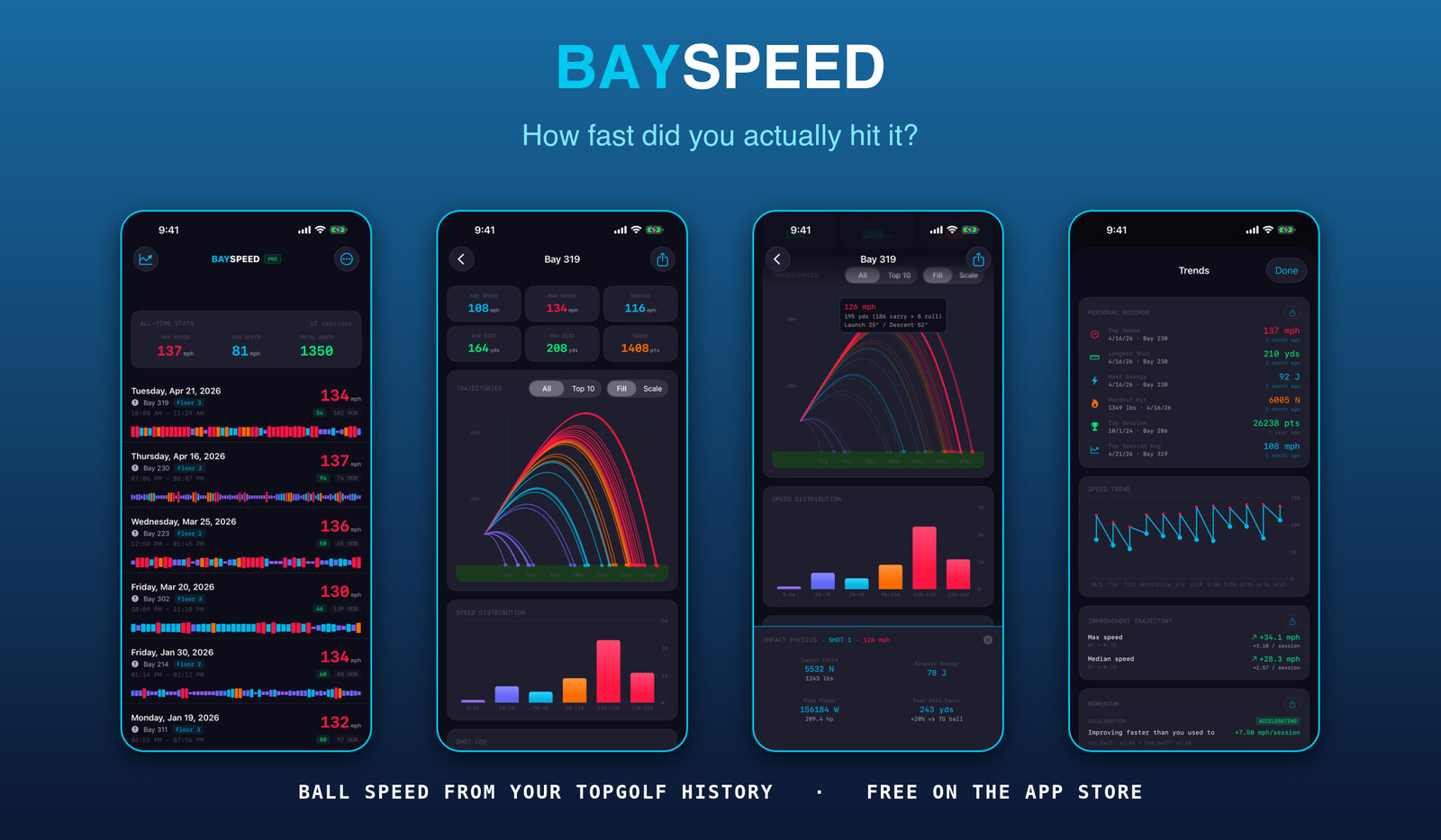
The free version analyzes your recent sessions in full, and there’s a one-time $6.99 Pro unlock for your complete history plus a trends layer—personal records, improvement trajectory, milestones, a forecast of when you’ll cross the next speed tier if your pace holds. No subscription. A shot-analytics app for a place you visit twice a month should not bill you monthly.
Getting it through App Review took three rejections, none of which had anything to do with the physics—that saga is probably its own post.
If you’re a Topgolf regular and you’ve ever wondered how hard you actually hit that 215-yard drive, that’s the itch this scratches. BaySpeed on the App Store—free to try, works on your existing game history the moment you sign in.
> **TL;DR:** Topgolf's system only records where each ball stopped—not how fast it left your club. I built an iOS app that recovers your ball speed by simulating the physics backwards from your game history. It's called [BaySpeed](https://apps.apple.com/us/app/bayspeed/id6777824892), it's free on the App Store, and this post is about how it works.
Back in April I wrote about [a typo I found](/venus-has-no-golf-courses.md) while reverse-engineering the Topgolf API—`venusMemberId`, frozen in production forever. That post was about the typo. This one is about what I was actually digging for.
I go to Topgolf a lot. Seventy-two games since October 2024, most of them crammed into a three-month stretch where I went from "occasionally embarrassing" to "occasionally decent." And the whole time, the number I cared about most was one Topgolf wouldn't give me: ball speed. How hard did I actually hit that one?
The frustrating part is that the number *exists*. Toptracer bays flash it on the screen right after your shot. But when the session ends, it evaporates. Your game history—the thing the app actually stores—comes from the RFID chip in each ball, and RFID only knows one thing: where the ball stopped. Quantized yardage to the target zones. That's it. The system watched your best drive of the night and wrote down the golf equivalent of "it went over there."
## Running the physics backwards
So the data I could pull from the API was a list of resting positions. The number I wanted was launch speed. Physics connects them, but in the wrong direction—given a launch speed, spin, and angle, simulating where the ball lands is straightforward. Newtonian mechanics, quadratic drag, Magnus lift, spin decaying over the flight. The textbook problem.
I needed the inverse, and the inverse has no clean closed form. But here's the nice thing about a physics simulation: it's a function. Feed in speed, get out distance. And it's monotonic—hit the ball harder, it goes farther. Which means you don't need to solve anything analytically. You can just binary-search it.
Guess 50 m/s. Simulate. Ball lands past where yours stopped? Guess lower. Short? Guess higher. Repeat until the simulated shot lands exactly where the RFID chip said your real ball did—including the drop from your bay's floor height, because hitting from the third floor buys you real yardage. The speed that survives the search is, within the model's assumptions, the speed you hit it.
I want to be honest about the error bars: these are estimates, ±10–15%. The yardage is quantized, the spin is assumed rather than measured, and the drag coefficient is calibrated against Toptracer ground truth rather than derived from first principles. My sanity check: the model's ceiling for my hardest shot came out around 124 mph, and Topgolf's own sensor had read ~115 on a similar swing. Inside the band. I'll take it.
## The app
BaySpeed is that pipeline with a UI on it. You sign in with your own Topgolf account—email code, the app never sees a password—and it imports your game history and runs every shot through the simulation. You get a trajectory replay for each shot, launch angle, carry versus roll, impact energy, and a speed distribution that quietly tells you whether your "I crushed that one" memory is supported by the evidence. (Mine frequently isn't. There's something clarifying about watching your ego get binary-searched down to its true value.)

The free version analyzes your recent sessions in full, and there's a one-time $6.99 Pro unlock for your complete history plus a trends layer—personal records, improvement trajectory, milestones, a forecast of when you'll cross the next speed tier if your pace holds. No subscription. A shot-analytics app for a place you visit twice a month should not bill you monthly.
Getting it through App Review took three rejections, none of which had anything to do with the physics—that saga is probably its own post.
If you're a Topgolf regular and you've ever wondered how hard you actually hit that 215-yard drive, that's the itch this scratches. [BaySpeed on the App Store](https://apps.apple.com/us/app/bayspeed/id6777824892)—free to try, works on your existing game history the moment you sign in.