🙃 I Kicked Alexa Off My Echo Spot and Installed Doom
TL;DR: The first-gen Echo Spot (codename rook) can be bootloader-unlocked with a public exploit called amonet. Once it’s unlocked you get TWRP and root, and you can flash an unofficial LineageOS 18.1 (Android 11) build. I turned mine into a round clock and weather display, a wake-word voice assistant that runs on my own Mac Studio instead of Amazon’s servers, and, inevitably, a Doom machine with a PS5 controller. It mostly works, but it’s an experimental port, and some of the rough edges took real work to fix.
I’ve had an Echo Spot sitting around since 2017. It’s a lovely object—a little ball with a 480×480 round screen—that only ever did a few things: tell the time, show the weather, and let Alexa misunderstand me. It wasn’t broken, just boring. And honestly, I’d stopped wanting an Amazon microphone in my apartment that always listened and that I couldn’t really inspect.
So I took it over.
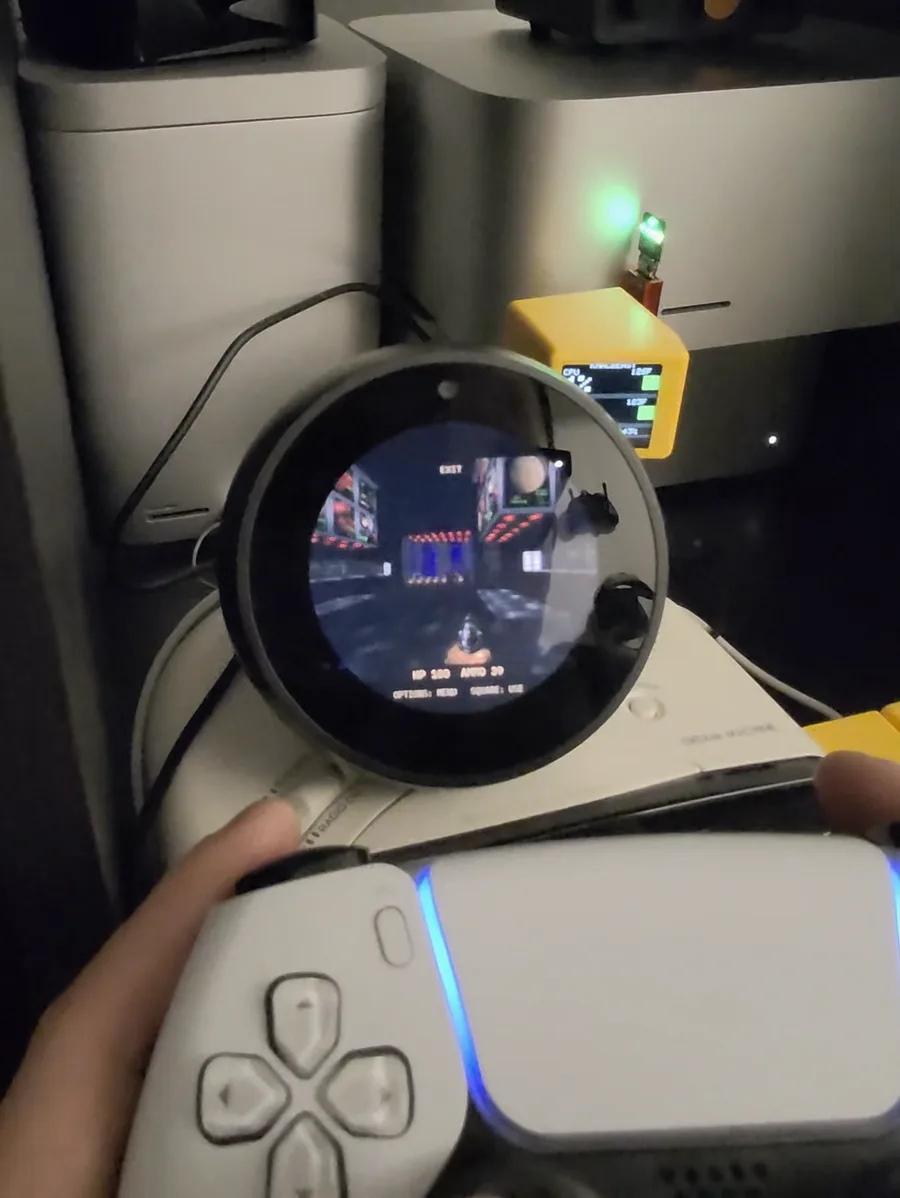 Spoiler: it runs Doom. That’s my SmallTV stats cube glowing on the Mac Studio behind it.
What “rooting” actually means here
The Spot runs Fire OS, which is Amazon’s fork of Android. A normal Fire OS device has a locked bootloader. It only boots software Amazon signed, so you can’t replace the OS or get root.
The rook exploit chain (amonet, by R0rt1z2) uses a weakness in the MediaTek boot ROM to get past that lock. After it runs, the bootloader is unlocked, you have TWRP (a custom recovery), and you get a root shell over ADB. From there the Spot is basically a small Android board with a speaker, four microphones and a round touchscreen, and you can put whatever you want on it.
Mine was on the last stock firmware (Fire OS 5.5.6.9), and the exploit worked fine on it.
What I ended up building
I did the unlock and the OS install in a single evening. Making the device actually pleasant to use took the rest of the week.
A clock I actually like. LineageOS’s stock launcher looks silly on a round screen, so I wrote a small native app called Orbit and set it as the home screen. It has a big clock with an arc for the seconds, a live Seattle hourly forecast from the National Weather Service, a 25-minute focus timer, and a status page. My first design was warm ivory on dark olive. A couple of revisions later it’s phosphor green on black in a terminal style, because that’s what I wanted to look at all day. It holds a keep-screen-on flag, so it never dims.
A voice assistant that isn’t Alexa. I wanted the Alexa experience without Amazon, so I built “Hey Qwen.” Wake-word detection runs on the Spot itself (Vosk), so audio never leaves the device until you’ve said the wake phrase. After that, the audio goes to my Mac Studio. Whisper transcribes it, a local Qwen model answers, and a macOS voice reads the answer back. It can look things up on the web, search my personal wiki and do math in a sandboxed Python/Bash environment. Weather answers come with a little photo card. You can interrupt it mid-answer, say “stop,” or just keep talking for a few seconds after it finishes, without the wake phrase. Nothing runs through a paid API.
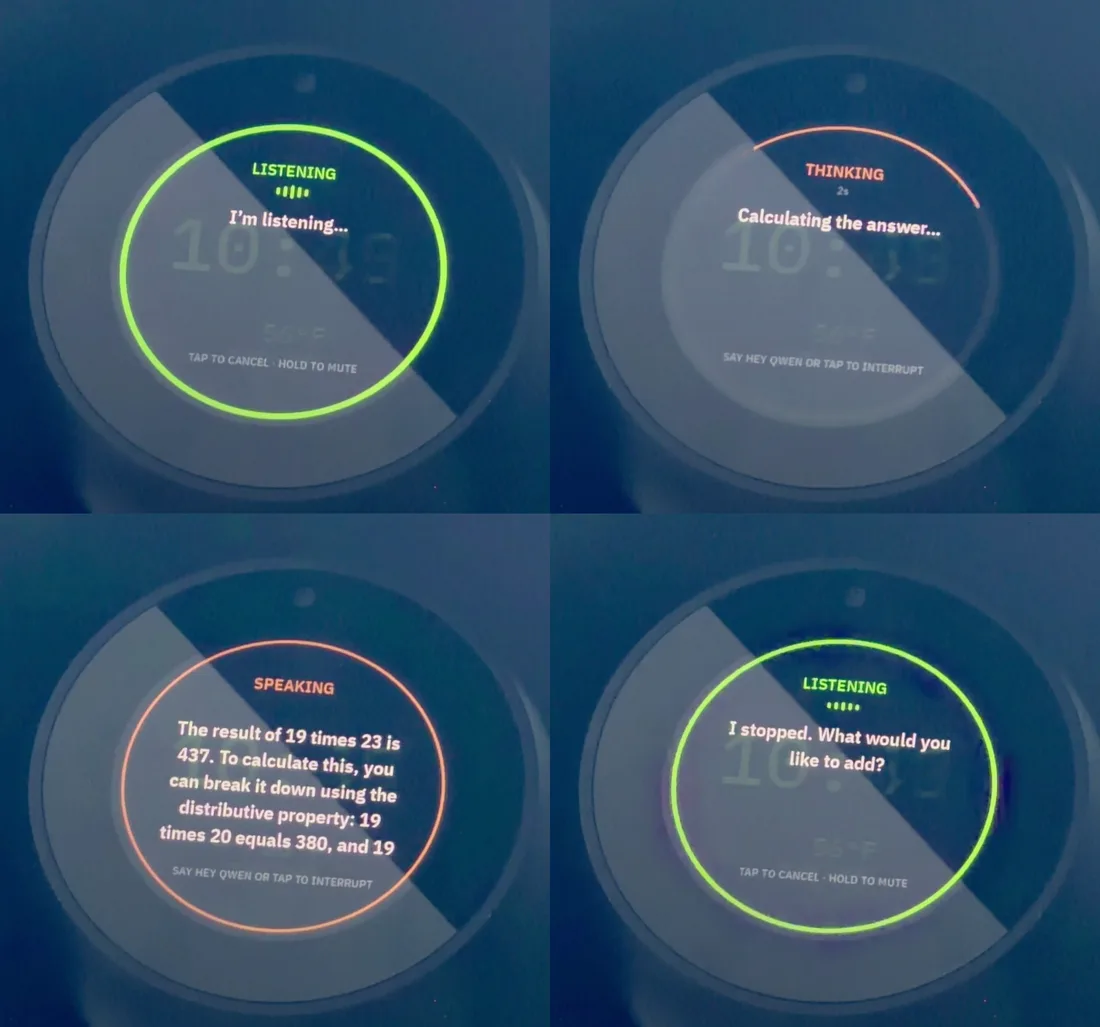 Asking for 19 × 23: listening, thinking on the Mac Studio, answering 437, then stopping when I cut in to change the question.
Doom. I mean, obviously. It runs the original shareware episode natively on the Spot, with a choice of two views: a “round” mode that crops to the circle, and a “classic fit” mode that shrinks the whole 4:3 frame and status bar to fit inside it. It plays at about 50 frames a second and works with a DualSense controller. The voice assistant keeps running in the background and hides its overlay while you play.
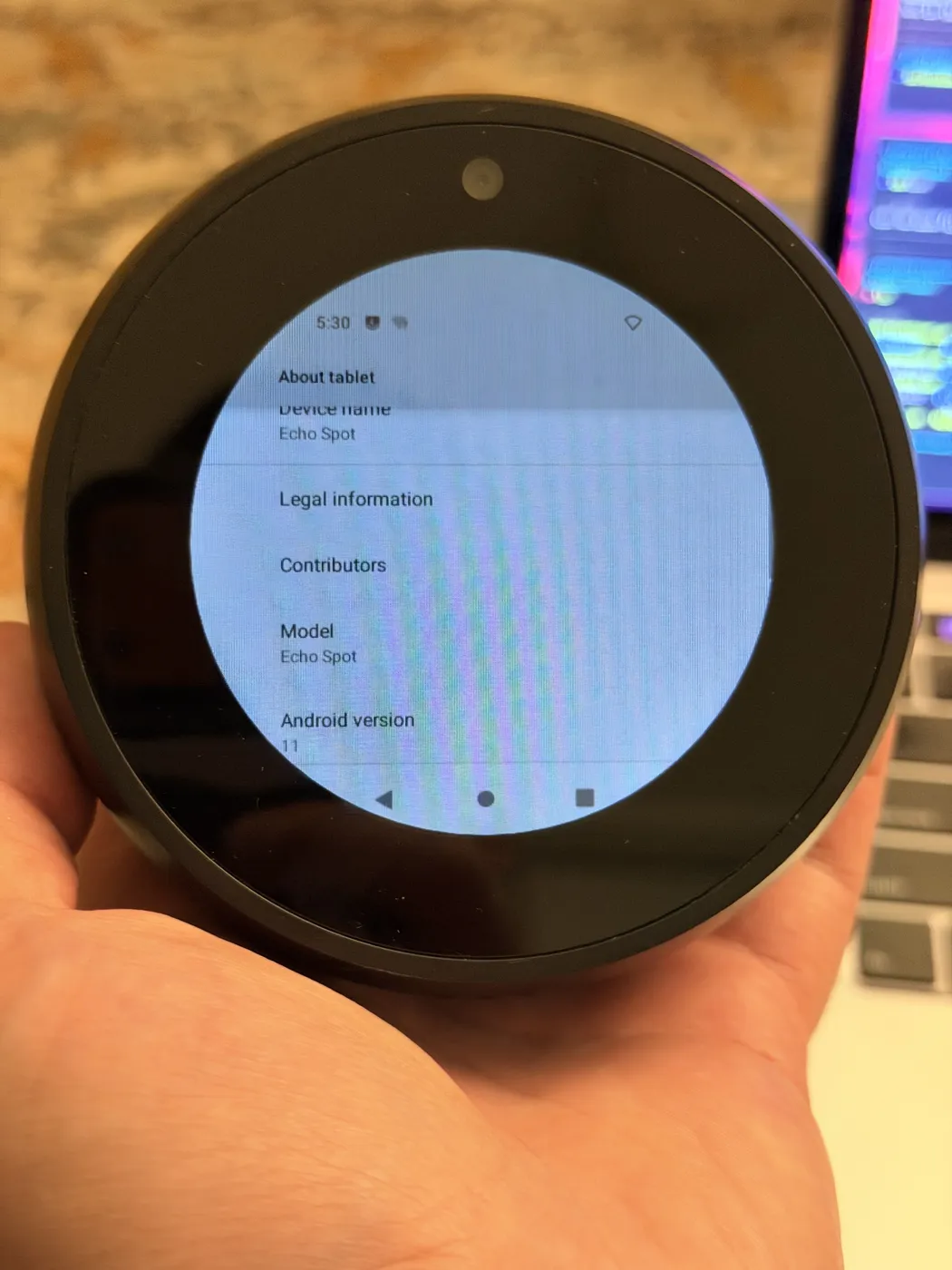 Android 11 on an Echo Spot. Amazon never shipped anything past Fire OS 5, which is based on Android 5.1.
The parts nobody tells you about
I want to be honest about this, because “I installed LineageOS on my Echo” can sound like a weekend afternoon. The install is quick. Getting the device to the point where you trust it every day takes much longer.
- The keyboard couldn’t type numbers. The bundled keyboard couldn’t enter digits in the Wi-Fi password field. That’s a known issue on the circular screen. I pushed my saved Wi-Fi credentials over ADB to get online, then installed HeliBoard.
- The microphones were quietly broken. This one cost me the most time. My assistant kept going deaf—Android said it was recording, but every sample was exactly zero. The vendor audio layer was mistaking an input handle for the FM tuner. The upstream maintainers had already fixed it in a commit newer than my ROM build, so I backed up the whole device again and replaced just that one audio library. Afterward, wake-word detection got noticeably better from across the room.
- Bluetooth crashed whenever it paired. Pairing the PS5 controller crashed Android’s Bluetooth stack every time—the chip simply stopped answering certain commands. The workaround that got me playing is a temporary one-byte patch that disables the Bluetooth chip’s UART sleep mode. It’s bind-mounted over the real file, so a reboot undoes it. It works, but it isn’t a permanent fix yet.
- Wireless debugging keeps turning itself off. I’ve seen it switch off across reboots without anything telling it to. Keep a USB cable that can carry data nearby.
- The mute button is the power button now. When I first booted, I thought the touchscreen was dead. The display was just asleep, and on this port the microphone-mute button acts as power.
The bigger tradeoffs:
- Brick risk is real. The unlock writes to boot-chain partitions. If you lose power or yank the cable at the wrong moment, you can end up with a paperweight.
- It’s unofficial and experimental. The maintainer lists camera, Bluetooth, mute switch and keyboard limitations. The security patch level is from early 2024, and SELinux is permissive. I wouldn’t use it for anything sensitive, and I don’t sign into anything important on it.
- No Alexa, no Amazon anything. For me that’s the point. If you depend on Alexa routines or smart-home skills, it’s a dealbreaker.
- Everything is your job now. When something breaks, there’s no support line. You’ll be the one reading logcat.
The upside
Even with all of that, I’m really happy with how it turned out. A device that was headed for a drawer (or a landfill) now does exactly what I want and nothing I don’t. Its microphones answer to me, the audio goes to a machine I own, and I can open any part of the stack and see why it did what it did. There’s also something deeply satisfying about saying “Hey Qwen, what’s 19 times 23?” and hearing the answer come from my own Mac Studio instead of a data center.
And I got to play Doom on an Echo Spot with a PS5 controller, which is reason enough on its own.
How to do it yourself
This is the path I took, not a replacement for the official guides. Read the author’s unlock guide on XDA and the LineageOS thread in full before you start. They’re the source of truth, and they get updated.
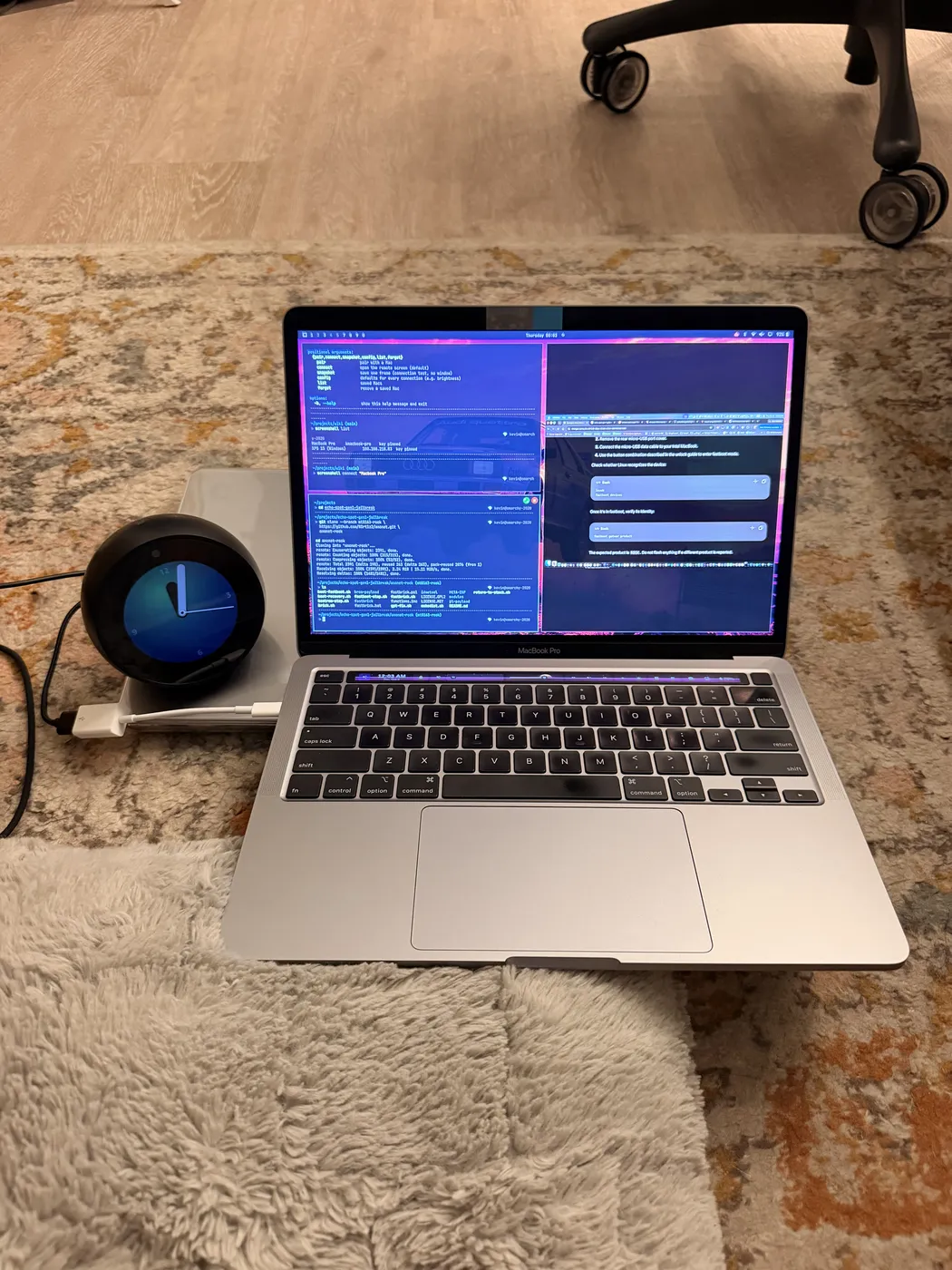 My whole setup: the Spot on a micro-USB data cable, plugged into an old MacBook Pro running Omarchy Linux.
What you need:
- A first-gen (2017) Echo Spot. The 2024 Spot is a different device, and none of this applies to it.
- A Linux machine with
adbandfastboot. I used a Linux laptop and needed no special drivers or sudo for USB access. - A micro-USB cable that carries data (many cheap ones don’t).
- The Spot on wall power the whole time.
1. Unlock with amonet
-
Download the official release ZIP (
amonet-rook-v2.0.0.zipwhen I did it) from the author’s XDA attachment. Don’t build it from a source clone—mine was missing the compiled payloads. XDA blockscurl, so download it in a normal browser. -
Test the ZIP, and record its SHA-256 so you can match it against what the thread lists.
-
Pop off the small cover on the back to get to the micro-USB port, and connect it to your computer.
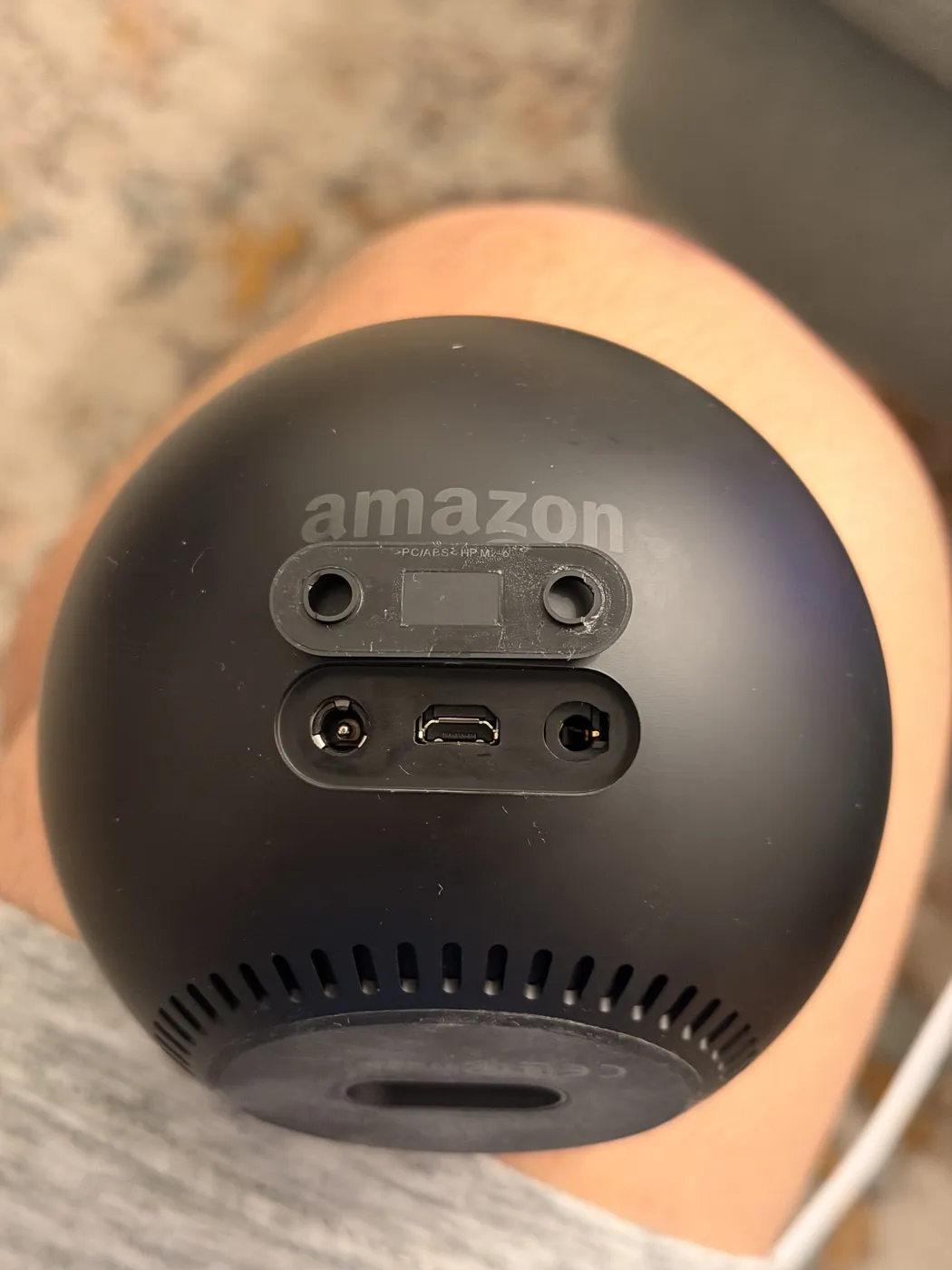 The micro-USB port hides under a little plate on the back.
-
Hold the button combination from the guide to boot into fastboot.
fastboot getvar productshould reportROOK. If it reports anything else, stop.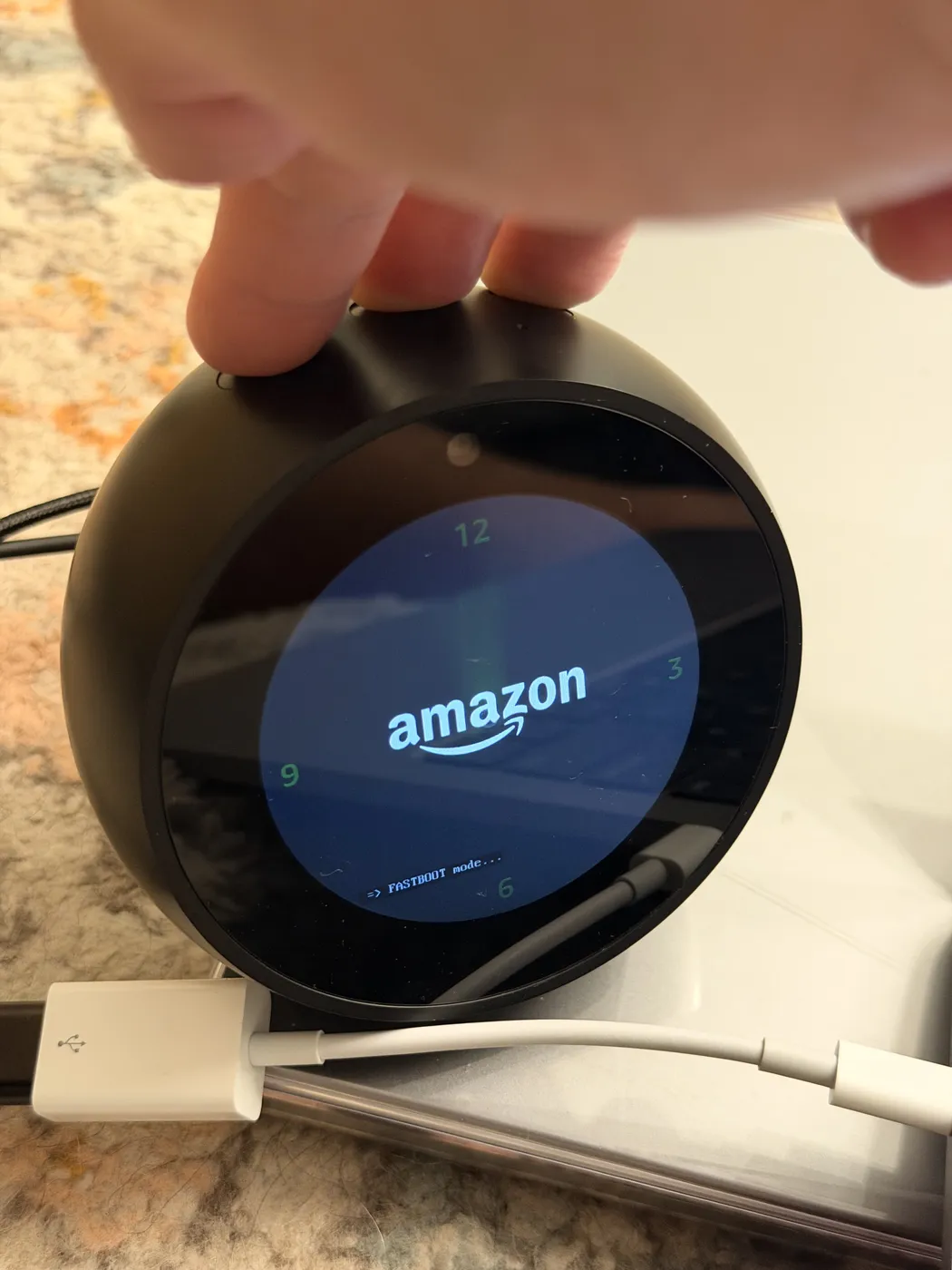 Fastboot mode, ready for the exploit.
-
Run the release’s
fastbrick.sh. It takes over the Spot’s screen with its own progress ring. Don’t unplug anything until it says it’s done.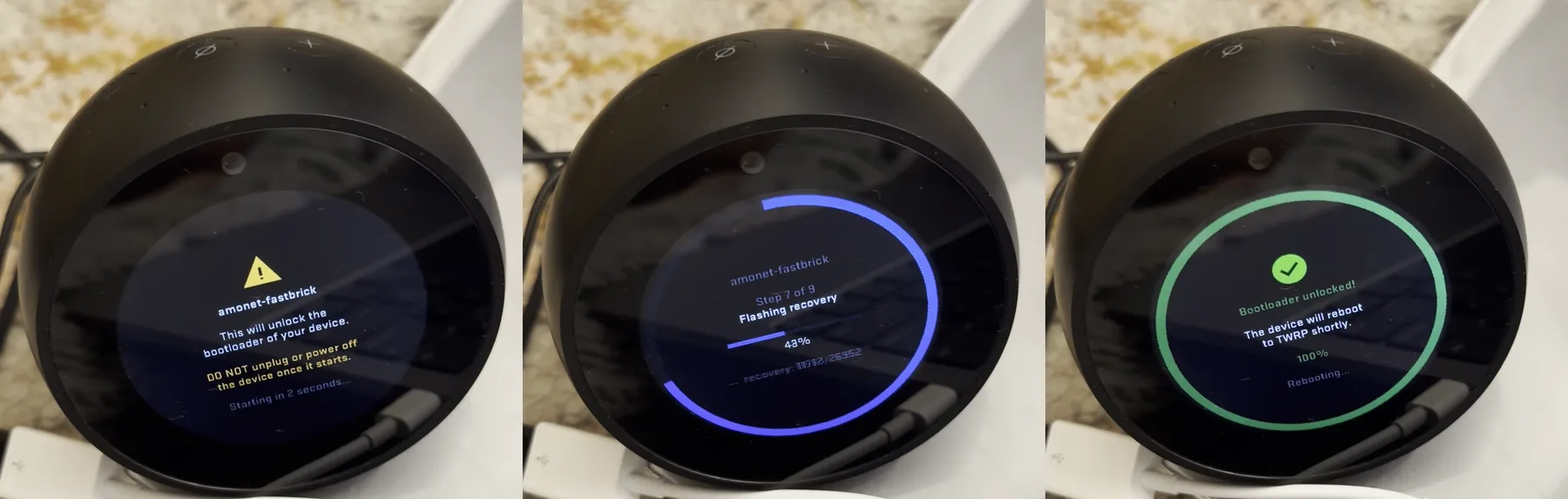 amonet takes over the Spot’s screen: the warning, flashing recovery, then “Bootloader unlocked!” It was over in about five seconds.
-
If everything worked, the device comes back in TWRP, and
adb shell idshowsuid=0(root). -
Reboot to fastboot and confirm the unlock:
fastboot getvar all 2>&1 | grep -E "product|unlock_status"
# product: ROOK
# unlock_status: true
It may still report secure: yes. That doesn’t mean the unlock failed.
2. Back up everything before you change anything else
This is the step people skip, and it’s the one that saved me later. Boot into TWRP, make sure nothing on the eMMC is mounted, and pull the raw disk plus both boot regions:
adb pull /dev/block/mmcblk0      spot-mmcblk0.img
adb pull /dev/block/mmcblk0boot0 spot-boot0.img
adb pull /dev/block/mmcblk0boot1 spot-boot1.img
Two gotchas:
- In this recovery, the
lk,tee1andtee2partition names are decoys that point to/dev/null. Back up the raw block devices, not the named partitions. - Use
adb pull, notadb exec-out dd. On this recovery,exec-outmixed error text into my binary output and then stalled.
Check that each file’s size is exactly right, and compare its hash with one computed on the device (adb shell sha256sum /dev/block/mmcblk0). Keep the backup somewhere private, because userdata can contain your saved credentials. And never blindly restore an entire disk image. It’s there so you can recover carefully, partition by partition.
3. Install LineageOS 18.1
I used lineage-18.1-rook-v0.3 (Android 11, no Google apps).
-
Verify the ROM’s SHA-256 against GitHub’s asset digest and the checksum file. The checksum in the release notes for v0.3 was a leftover from v0.2 and didn’t match.
-
Push the ROM into recovery’s RAM so the wipes can’t delete it, and check its hash there:
adb push lineage-18.1-*-rook.zip /tmp/lineage-rook.zip adb shell sha256sum /tmp/lineage-rook.zip -
Wipe and install in the order the maintainer’s instructions give. TWRP’s command line does it without touching the tiny screen:
adb shell twrp wipe data adb shell twrp wipe cache adb shell twrp wipe system adb shell twrp install /tmp/lineage-rook.zip -
Reboot. If it drops into fastboot instead of Android,
fastboot continueboots the new OS.
4. Make it livable
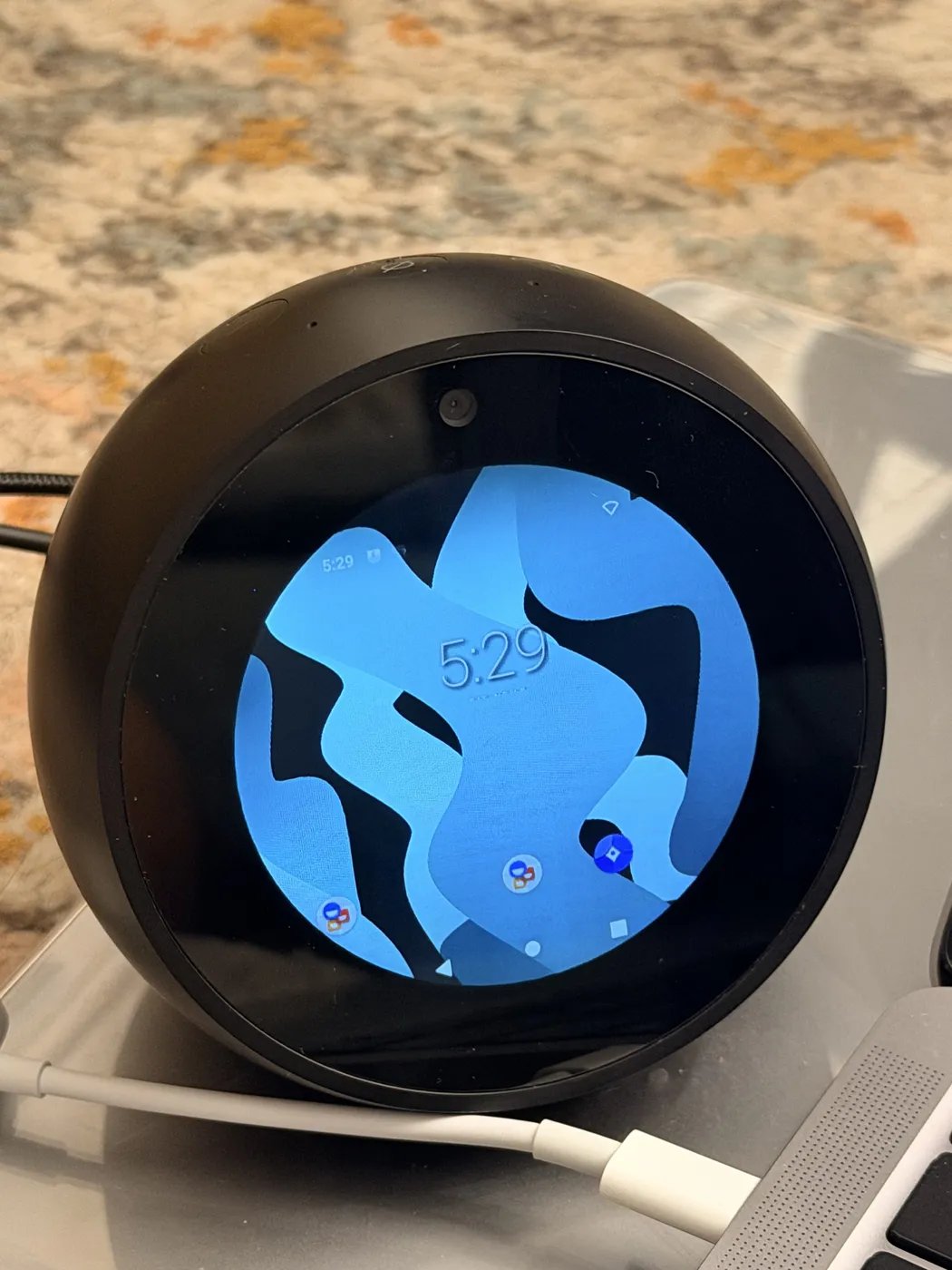 First boot into LineageOS. It works, but stock Android on a round screen isn’t something you’d want to look at all day.
- Wake the screen with the mute button.
- Install a better keyboard. I used HeliBoard from its official GitHub releases. Until then, you may need to type your Wi-Fi password over ADB.
- Turn on Developer options and Wireless debugging, then pair with a pairing code so you can deploy without a cable. Also turn off “revoke authorizations” so you don’t have to re-pair later.
- Stop the screen from dimming. Use LineageOS’s Caffeine Quick Settings tile (long-press it for ∞), or have your home app hold a keep-screen-on flag. Caffeine resets on reboot.
- Fix the timezone. Mine booted in GMT.
From there, it’s just Android. Any app you build with minSdk 30 or lower and an armv7 build will run. Write something for a 480×480 circle—big centered text, one idea per screen—and it’ll look like it belongs there.
Would I recommend it?
If you have a first-gen Spot gathering dust and you’re comfortable with ADB, yes. The unlock is well documented, the risk is manageable if you keep it powered and back it up first, and the result is a charming little device that’s actually yours. If you want something that just works the day you set it up, leave it on Fire OS. This is a hobby project.
**TL;DR:** The first-gen Echo Spot (codename `rook`) can be bootloader-unlocked with a public exploit called amonet. Once it's unlocked you get TWRP and root, and you can flash an unofficial LineageOS 18.1 (Android 11) build. I turned mine into a round clock and weather display, a wake-word voice assistant that runs on my own Mac Studio instead of Amazon's servers, and, inevitably, a Doom machine with a PS5 controller. It mostly works, but it's an experimental port, and some of the rough edges took real work to fix.
I've had an Echo Spot sitting around since 2017. It's a lovely object—a little ball with a 480×480 round screen—that only ever did a few things: tell the time, show the weather, and let Alexa misunderstand me. It wasn't broken, just boring. And honestly, I'd stopped wanting an Amazon microphone in my apartment that always listened and that I couldn't really inspect.
So I took it over.

*Spoiler: it runs Doom. That's my [SmallTV stats cube](/smalltv-mac-stats-cube.md) glowing on the Mac Studio behind it.*
## What "rooting" actually means here
The Spot runs Fire OS, which is Amazon's fork of Android. A normal Fire OS device has a locked bootloader. It only boots software Amazon signed, so you can't replace the OS or get root.
The `rook` exploit chain (amonet, by R0rt1z2) uses a weakness in the MediaTek boot ROM to get past that lock. After it runs, the bootloader is unlocked, you have TWRP (a custom recovery), and you get a root shell over ADB. From there the Spot is basically a small Android board with a speaker, four microphones and a round touchscreen, and you can put whatever you want on it.
Mine was on the last stock firmware (Fire OS 5.5.6.9), and the exploit worked fine on it.
## What I ended up building
I did the unlock and the OS install in a single evening. Making the device actually pleasant to use took the rest of the week.
**A clock I actually like.** LineageOS's stock launcher looks silly on a round screen, so I wrote a small native app called Orbit and set it as the home screen. It has a big clock with an arc for the seconds, a live Seattle hourly forecast from the National Weather Service, a 25-minute focus timer, and a status page. My first design was warm ivory on dark olive. A couple of revisions later it's phosphor green on black in a terminal style, because that's what I wanted to look at all day. It holds a keep-screen-on flag, so it never dims.
**A voice assistant that isn't Alexa.** I wanted the Alexa experience without Amazon, so I built "Hey Qwen." Wake-word detection runs on the Spot itself (Vosk), so audio never leaves the device until you've said the wake phrase. After that, the audio goes to my Mac Studio. Whisper transcribes it, a local Qwen model answers, and a macOS voice reads the answer back. It can look things up on the web, search my personal wiki and do math in a sandboxed Python/Bash environment. Weather answers come with a little photo card. You can interrupt it mid-answer, say "stop," or just keep talking for a few seconds after it finishes, without the wake phrase. Nothing runs through a paid API.

*Asking for 19 × 23: listening, thinking on the Mac Studio, answering 437, then stopping when I cut in to change the question.*
**Doom.** I mean, obviously. It runs the original shareware episode natively on the Spot, with a choice of two views: a "round" mode that crops to the circle, and a "classic fit" mode that shrinks the whole 4:3 frame and status bar to fit inside it. It plays at about 50 frames a second and works with a DualSense controller. The voice assistant keeps running in the background and hides its overlay while you play.

*Android 11 on an Echo Spot. Amazon never shipped anything past Fire OS 5, which is based on Android 5.1.*
## The parts nobody tells you about
I want to be honest about this, because "I installed LineageOS on my Echo" can sound like a weekend afternoon. The install is quick. Getting the device to the point where you trust it every day takes much longer.
- **The keyboard couldn't type numbers.** The bundled keyboard couldn't enter digits in the Wi-Fi password field. That's a known issue on the circular screen. I pushed my saved Wi-Fi credentials over ADB to get online, then installed HeliBoard.
- **The microphones were quietly broken.** This one cost me the most time. My assistant kept going deaf—Android said it was recording, but every sample was exactly zero. The vendor audio layer was mistaking an input handle for the FM tuner. The upstream maintainers had already fixed it in a commit newer than my ROM build, so I backed up the whole device again and replaced just that one audio library. Afterward, wake-word detection got noticeably better from across the room.
- **Bluetooth crashed whenever it paired.** Pairing the PS5 controller crashed Android's Bluetooth stack every time—the chip simply stopped answering certain commands. The workaround that got me playing is a temporary one-byte patch that disables the Bluetooth chip's UART sleep mode. It's bind-mounted over the real file, so a reboot undoes it. It works, but it isn't a permanent fix yet.
- **Wireless debugging keeps turning itself off.** I've seen it switch off across reboots without anything telling it to. Keep a USB cable that can carry data nearby.
- **The mute button is the power button now.** When I first booted, I thought the touchscreen was dead. The display was just asleep, and on this port the microphone-mute button acts as power.
The bigger tradeoffs:
- **Brick risk is real.** The unlock writes to boot-chain partitions. If you lose power or yank the cable at the wrong moment, you can end up with a paperweight.
- **It's unofficial and experimental.** The maintainer lists camera, Bluetooth, mute switch and keyboard limitations. The security patch level is from early 2024, and SELinux is permissive. I wouldn't use it for anything sensitive, and I don't sign into anything important on it.
- **No Alexa, no Amazon anything.** For me that's the point. If you depend on Alexa routines or smart-home skills, it's a dealbreaker.
- **Everything is your job now.** When something breaks, there's no support line. You'll be the one reading logcat.
## The upside
Even with all of that, I'm really happy with how it turned out. A device that was headed for a drawer (or a landfill) now does exactly what I want and nothing I don't. Its microphones answer to me, the audio goes to a machine I own, and I can open any part of the stack and see why it did what it did. There's also something deeply satisfying about saying "Hey Qwen, what's 19 times 23?" and hearing the answer come from my own Mac Studio instead of a data center.
And I got to play Doom on an Echo Spot with a PS5 controller, which is reason enough on its own.
## How to do it yourself
This is the path I took, not a replacement for the official guides. **Read the [author's unlock guide on XDA](https://xdaforums.com/t/unlock-root-twrp-unbrick-amazon-echo-spot-2017-rook.4754878/) and the [LineageOS thread](https://xdaforums.com/t/rom-unofficial-11-rook-lineageos-18-1-for-the-amazon-echo-spot-2017.4762459/) in full before you start.** They're the source of truth, and they get updated.

*My whole setup: the Spot on a micro-USB data cable, plugged into an old MacBook Pro running Omarchy Linux.*
**What you need:**
- A **first-gen (2017) Echo Spot**. The 2024 Spot is a different device, and none of this applies to it.
- A Linux machine with `adb` and `fastboot`. I used a Linux laptop and needed no special drivers or sudo for USB access.
- A micro-USB cable that **carries data** (many cheap ones don't).
- The Spot on wall power the whole time.
### 1. Unlock with amonet
1. Download the **official release ZIP** (`amonet-rook-v2.0.0.zip` when I did it) from the author's XDA attachment. Don't build it from a source clone—mine was missing the compiled payloads. XDA blocks `curl`, so download it in a normal browser.
2. Test the ZIP, and record its SHA-256 so you can match it against what the thread lists.
3. Pop off the small cover on the back to get to the micro-USB port, and connect it to your computer.

*The micro-USB port hides under a little plate on the back.*
4. Hold the button combination from the guide to boot into fastboot. `fastboot getvar product` should report `ROOK`. If it reports anything else, stop.

*Fastboot mode, ready for the exploit.*
5. Run the release's `fastbrick.sh`. It takes over the Spot's screen with its own progress ring. Don't unplug anything until it says it's done.

*amonet takes over the Spot's screen: the warning, flashing recovery, then "Bootloader unlocked!" It was over in about five seconds.*
6. If everything worked, the device comes back in TWRP, and `adb shell id` shows `uid=0(root)`.
7. Reboot to fastboot and confirm the unlock:
```bash
fastboot getvar all 2>&1 | grep -E "product|unlock_status"
# product: ROOK
# unlock_status: true
```
It may still report `secure: yes`. That doesn't mean the unlock failed.
### 2. Back up everything before you change anything else
This is the step people skip, and it's the one that saved me later. Boot into TWRP, make sure nothing on the eMMC is mounted, and pull the raw disk plus both boot regions:
```bash
adb pull /dev/block/mmcblk0 spot-mmcblk0.img
adb pull /dev/block/mmcblk0boot0 spot-boot0.img
adb pull /dev/block/mmcblk0boot1 spot-boot1.img
```
Two gotchas:
- In this recovery, the `lk`, `tee1` and `tee2` partition names are **decoys that point to `/dev/null`**. Back up the raw block devices, not the named partitions.
- Use `adb pull`, not `adb exec-out dd`. On this recovery, `exec-out` mixed error text into my binary output and then stalled.
Check that each file's size is exactly right, and compare its hash with one computed on the device (`adb shell sha256sum /dev/block/mmcblk0`). Keep the backup somewhere private, because userdata can contain your saved credentials. And never blindly restore an entire disk image. It's there so you can recover carefully, partition by partition.
### 3. Install LineageOS 18.1
I used [`lineage-18.1-rook-v0.3`](https://github.com/amazon-oss/releases/releases/tag/lineage-18.1-rook-v0.3) (Android 11, no Google apps).
1. Verify the ROM's SHA-256 against **GitHub's asset digest and the checksum file**. The checksum in the release notes for v0.3 was a leftover from v0.2 and didn't match.
2. Push the ROM into recovery's RAM so the wipes can't delete it, and check its hash there:
```bash
adb push lineage-18.1-*-rook.zip /tmp/lineage-rook.zip
adb shell sha256sum /tmp/lineage-rook.zip
```
3. Wipe and install in the order the maintainer's instructions give. TWRP's command line does it without touching the tiny screen:
```bash
adb shell twrp wipe data
adb shell twrp wipe cache
adb shell twrp wipe system
adb shell twrp install /tmp/lineage-rook.zip
```
4. Reboot. If it drops into fastboot instead of Android, `fastboot continue` boots the new OS.
### 4. Make it livable

*First boot into LineageOS. It works, but stock Android on a round screen isn't something you'd want to look at all day.*
- **Wake the screen** with the mute button.
- **Install a better keyboard.** I used HeliBoard from its official GitHub releases. Until then, you may need to type your Wi-Fi password over ADB.
- **Turn on Developer options and Wireless debugging**, then pair with a pairing code so you can deploy without a cable. Also turn off "revoke authorizations" so you don't have to re-pair later.
- **Stop the screen from dimming.** Use LineageOS's **Caffeine** Quick Settings tile (long-press it for ∞), or have your home app hold a keep-screen-on flag. Caffeine resets on reboot.
- **Fix the timezone.** Mine booted in GMT.
From there, it's just Android. Any app you build with `minSdk` 30 or lower and an armv7 build will run. Write something for a 480×480 circle—big centered text, one idea per screen—and it'll look like it belongs there.
## Would I recommend it?
If you have a first-gen Spot gathering dust and you're comfortable with ADB, yes. The unlock is well documented, the risk is manageable if you keep it powered and back it up first, and the result is a charming little device that's actually yours. If you want something that just works the day you set it up, leave it on Fire OS. This is a hobby project.